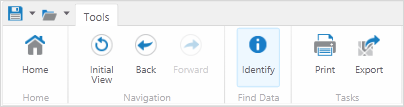
The toolbar in the application can contain any number of tools, groups of tools, or tabs containing several groups of tools. The Geocortex Viewer for Silverlight is usually customized to suit a particular purpose. Customization means that the toolbar of your application may be very different depending on how it is going to be used.
A simple application may have only one toolbar tab with a few essential tools available.
Example of a simple toolbar
A complex application may have multiple tabs each containing many groups of tools grouped by function.

Example of a complex toolbar showing multiple tabs and groups of tools
A toolbar may contain tools that are arranged differently. It is also possible that groups or individual tools have a different name or icon.
The toolbar is usually not visible when you first open the map. To open the toolbar, either:
Click the Show Toolbar icon in the top right corner of the map.

Show Toolbar icon
Because each Geocortex Viewer for Silverlight is likely to have a different set of tools in the toolbar, the topics that follow contain a list of all the possible tools. The tools sets are grouped by a common function as they are likely to also be grouped on a toolbar. For example, the tools used for editing the map are in one group and the tools used for navigation in another.